New Feature: Smart New Version Check & UIKit Previews Since Version 2.2.2
Table of Contents
Abstract
While working on multiple mobile app projects, I noticed two recurring problems:
- Users often don’t update the app because they never know a new version is available.
- UIKit developers struggle to preview views quickly without running the whole app.
So in this update, we introduce two improvements to make development and user experience smoother.
Let’s Code
Auto-Check for New App Versions
Apps should always stay up to date with the latest performance and stability improvements. This new feature automatically checks for the latest version on the App Store and displays an update popup when needed.
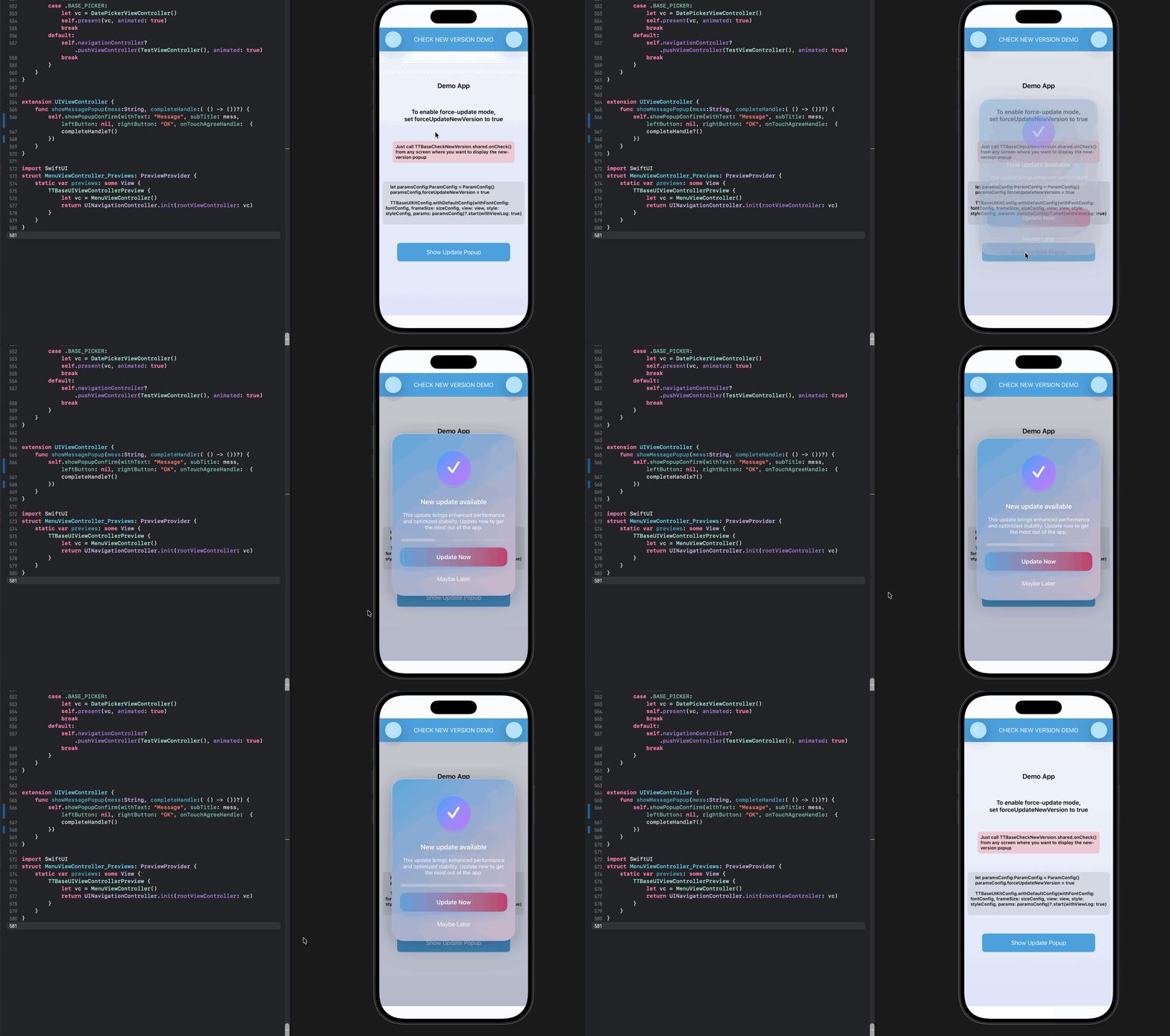
Auto-Check for New App Versions - TTBaseUIKitExample
TTBaseUIKit yet, you should read the setup guide at ttbaseuikit-ui-framework.
Then, you just need to call
import TTBaseUIKit
TTBaseCheckNewVersion.shared.onCheck()
If you don’t want the library to automatically fetch your app information using the buildId, simply provide it manually via paramConfig.appId.
let paramConfig:ParamConfig = ParamConfig()
paramConfig.appId = 1191396802
paramConfig.forceUpdateNewVersion = true
paramConfig.isGetNewVersionMessageByAppStore = true
TTBaseUIKitConfig.withDefaultConfig(withFontConfig: fontConfig, frameSize: sizeConfig, view: customView, style: styleConfig, params: paramConfig)?.start(withViewLog: false)
appId: Your application’s ID on the Apple App Store.forceUpdateNewVersion: Set totrueif you want to require users to update the app to the latest version before they can continue using it.isGetNewVersionMessageByAppStore: Set totrueif you want to retrieve the update message directly from the App Store.
Or you can customize the messages using the following language file:
"TTBaseUIkit.NewVersion.Title" = "New update available";
"TTBaseUIkit.NewVersion.SubTitle" = "This update brings enhanced performance and optimized stability. Update now to get the most out of the app";
"TTBaseUIkit.NewVersion.Button.Update" = "Update Now";
"TTBaseUIkit.NewVersion.Button.Later" = "Maybe Later";
Preview UIKit Views with PreviewProvider
SwiftUI already gives us powerful live previews, but UIKit developers have always lacked something similar.
Now you can preview any UIKit view directly inside Xcode using PreviewProvider.
- No need to run the app just to check small UI changes.
- Faster UI iterations.
- Easier debugging for layout, spacing, and edge cases.
UIViews
If you want to quickly preview UIViews, you can use TTBaseUIViewPreview.
 struct TTBaseUIViewPreview_Previews: PreviewProvider {
     static var previews: some View {
         TTBaseUIViewPreview {
             let testView:TTBaseUIView = TTBaseUIView()
             testView.setBgColor(UIColor.gray.withAlphaComponent(0.2))
             testView.setConerDef()
             return testView
         }
         .size(height: 200.0)
         .padding()
     }
 }
ViewControllers
If you want to quickly preview ViewControllers, you can use TTBaseUIViewControllerPreview.
struct MenuViewController_Previews: PreviewProvider {
    static var previews: some View {
        TTBaseUIViewControllerPreview {
            let vc = MenuViewController()
            return UINavigationController.init(rootViewController: vc)
        }
    }
}
Cells
If you want to quickly preview cells in table views and collection views, use TTBaseCellPreview.
 struct TTBaseCellPreviewPreview: PreviewProvider {
     static var previews: some View {
         TTBaseCellPreview(size: .init(width: 340, height: 80)) {
             let cell = TTIconTextSubtextTableViewCell()
             cell.panel.setHeightAnchor(constant: 80.0)
             return cell
         }
         .size(height: 80.0)
         .previewLayout(.sizeThatFits)
     }
 }
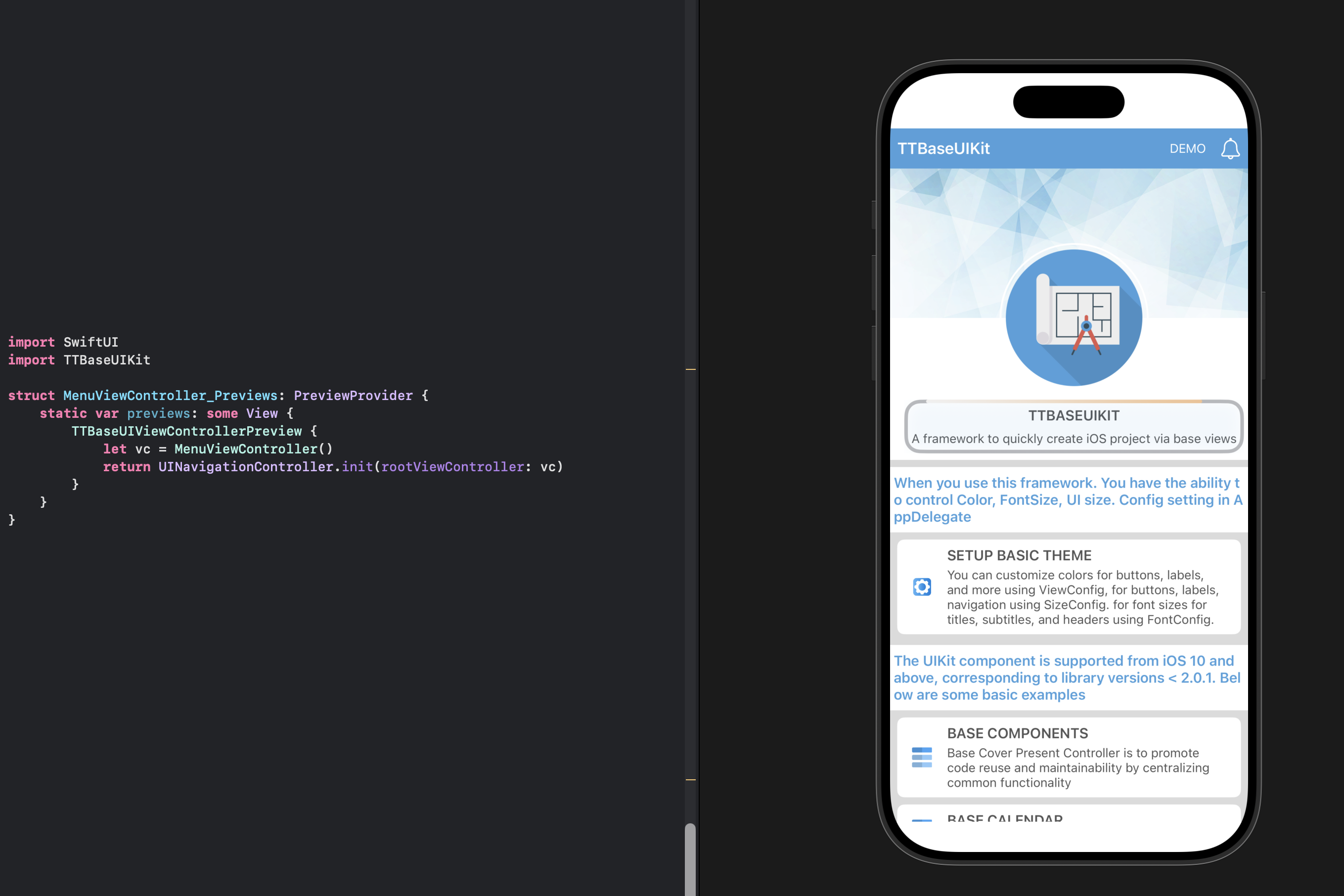
Preview UIKit - TTBaseUIKit Example
Conclusion
Both features aim to reduce the time spent on repetitive tasks and improve the overall development flow:
- Automatic version checking: keeps users on the latest build.
- UIKit previews: lets developers see UI changes instantly without running the app.
These updates continue the original goal of the base framework: build faster, debug smarter, and write less repetitive code.
TTBaseUIKit is a framework that helps you build iOS applications in the fastest and most efficient way, by providing base views written in both
UIKit ProgrammaticallyandSwiftUI. The current release of TTBaseUIKit supports all versions of iOS and OS X since the introduction of Auto Layout on each platform, in Swift language with a single codebase.
What’s Next?
We’ve finished implementing the new version checking feature. In the next post, we’ll introduce the app update notification feature, helping users understand what’s new and what to pay attention to after updating the app. Happy coding! See you soon ^^
Posts in this Series
- New Feature: Smart New Version Check & UIKit Previews Since Version 2.2.2
- New Feature: UI Debugging in TTBaseUIKit Since Version 2.2.1
- TTBaseUIKit Has Been Integrated With SwiftUI Since Version 2.1.0
- Rebuiding Train Booking Feature by SwiftUI in 12Bay Application - Design
- What Is the Spacer and How Do We Use It in SwiftUI
- 12Bay Integrated SwiftUI. With 12Bay, No StoryBoard, No XIB Files, No Cocoapods, ...
- Understand View in SwiftUI
- Understand Safe Area in SwiftUI
- WWDC23 From the Perspective of an IOS Developer
- SwiftUI Series - Updating TTBaseUIKit to Support SwiftUI
